I wrote about “Definition of Done” recently. Nice when something moves from “Doing” to “Done”. But then what?
In my case, the result is usually text like this. How does it get online though?
I’m a first-generation WordPresser. Back then, my first stop was always WordPress. You want a blog? I’ll find you a template, customise it, and you can fill it comfortably through WordPress. Over time you add plugins. Daily updates. Often compatibility issues that break everything.
I spent so much time finding decent backup solutions that creativity got shoved completely into the background.
Better, faster blogging with static generators
Seven years ago I switched to static website generators. The idea: no database needed. (Another problem solved — if your site dies, can you reconnect your old database? How long does that take?)
Instead, the generator outputs simple HTML5 files in a directory that you upload to your server. The big advantage: you can restore your website anytime if things go wrong or you switch providers.
I’ve tried various static generators over the years — Kirby, Grav, Jekyll. Eventually settled on Hugo. Hugo’s more for technically interested users. You install it on your machine or server and work from the shell.
The beauty is testing all generated pages offline before uploading to the server.
My Hugo-Git workflow
Next challenge: writing texts on any device and preparing them for upload. That’s where Git entered the picture. I push and pull my Hugo website via Git on Bitbucket. My content lives on my devices and in the cloud.
If my Raspberry Pi or web server dies, no problem. Some of my sites use Netlify for delivery, but for publishing reinergaertner.de I take a more direct route through rsync.
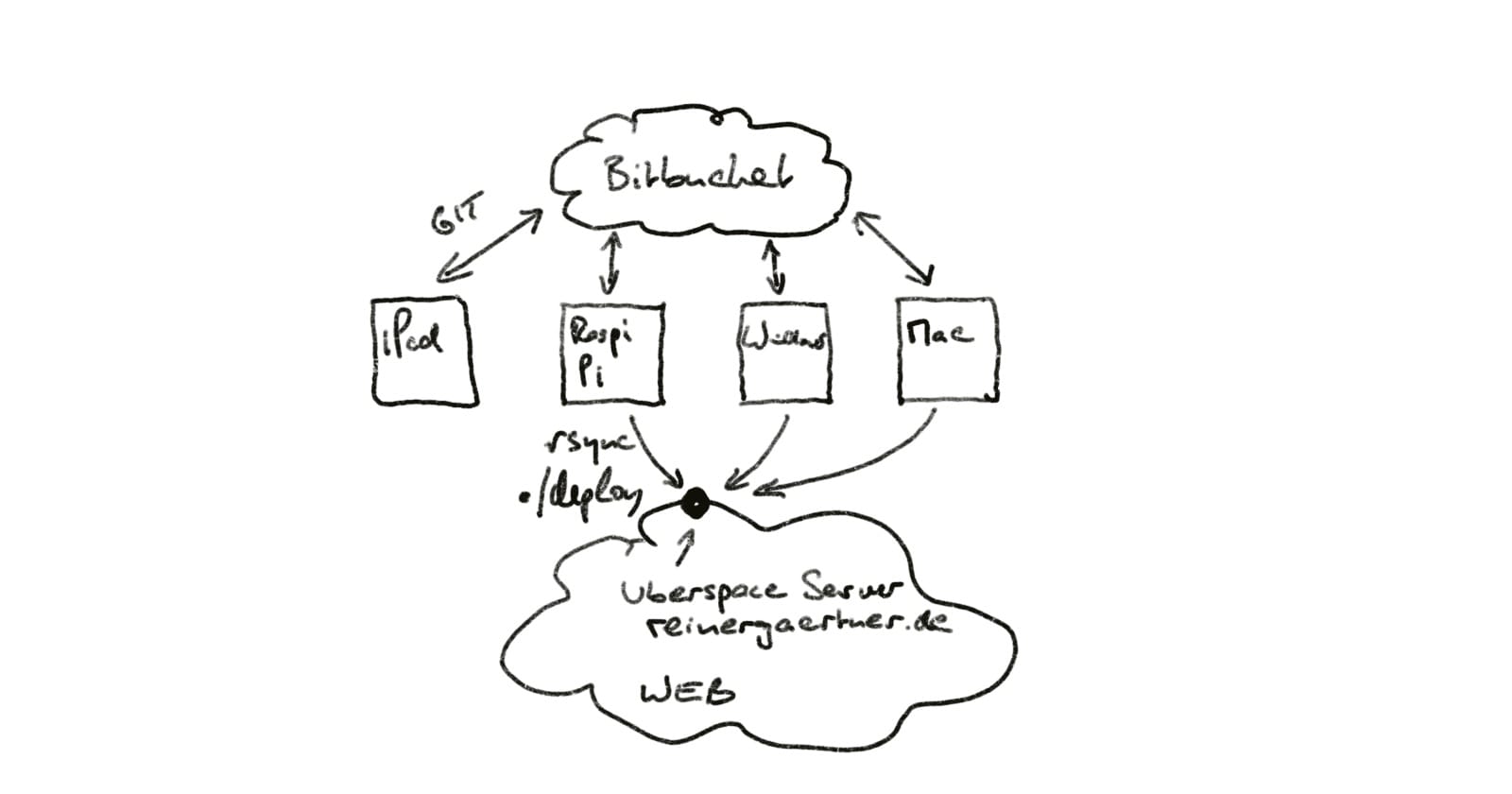
How does it work? I fire up my computer, write text in Markdown, add minimal descriptions, and save the text (the webpage) to my computer. Then I check everything displays properly.
If it looks good, I type “./deploy”. Hugo generates the new website and automatically uploads content via rsync to a predefined web directory (mine goes to an Uberspace server). You can see how the synchronisation works on the Hugo site.
Uncomplicated, fast, future-proof
Granted, it sounds complicated. But once set up, it works beautifully smooth and fast. Best part: I never worry about getting into major trouble if my website gets hacked.
No updates needed.
Even better: my texts are stored in readable plain text files that’ll still be there in many years. How do you access your texts when WordPress hangs? I can only recommend taking the simple path, even if the start is a bit more complex.
So: ./deploy!
This post started in German on reinergaertner.de — yes, 1997, I’ve been doing this a while. The translation was AI-assisted. Any remaining awkwardness is authentically bilingual.